ChatGPT ?hints Parameter: See What ChatGPT Actually Searches For
ChatGPT doesn't just answer from memory. About a third of the time, it searches the web - and the queries it generates internally look nothing like what the user typed. An undocumented URL parameter called ?hints=search lets you see exactly what ChatGPT searches for and which sources it cites.
The insights from that data are more valuable than the parameter itself. ChatGPT's fan-out queries reveal a hidden layer of commercial, comparison-heavy search intent that doesn't exist in Google keyword databases. Companies using this data to find content gaps are seeing AI visibility jumps from single digits to double digits in under three months.
Key Takeaways
- ChatGPT searches the web in 31-34.5% of prompts, generating 2+ internal fan-out queries per search that average 5.48 words - 60% longer than Google searches (Nectiv/Search Engine Land, Semrush)
- The
?hints=searchURL parameter triggers ChatGPT Search and lets you extract internal queries, cited sources, and supporting URLs through JSON export - Fan-out queries add commercial modifiers ("best," "reviews," "comparison," "[year]") - 65-85% of ChatGPT prompts don't match any existing Google keyword (Semrush 27B-term database)
- Source selection follows a hard authority cliff: 65.3% of top citations come from DR 81+ domains, but page-level authority barely matters - domain trust is the gate (Ahrefs)
- Companies using fan-out data to find content gaps see results: AI visibility from 2.4% to 12.9% in 92 days, 15% of sales from ChatGPT referrals, 30-day citation appearances after publishing targeted guides
- Run 100 industry prompts through
?hints=search, extract QFOs and sources, and map gaps between what ChatGPT searches for and what your content covers
What Is the ?hints Parameter and Why Does It Matter?
The ?hints=search URL parameter triggers ChatGPT's web search mode directly from a URL. Append it to chatgpt.com with a query and ChatGPT will search the web, show its sources, and cite them in the response.
The URL format:
https://chatgpt.com/?hints=search&q=best crm for startups 2026This works for any ChatGPT Plus user as of April 2026. OpenAI has never officially documented it - the parameter emerged from community discovery by Jerome Salomon in October 2025 and has been validated by commercial AI visibility platforms since. It's a UI hint that opens browsing mode, not a backend API override, but it reliably triggers search.
The real value isn't the parameter itself. It's what it exposes.
When ChatGPT searches, it doesn't send your exact prompt to the web. It rewrites your question into multiple internal sub-queries called "fan-out queries" (QFOs), retrieves candidate pages, and selects which ones to cite. The ?hints parameter lets you see all of this - the internal queries, the sources considered, the sources actually cited - through ChatGPT's conversation JSON export. That data reveals how ChatGPT discovers and selects content, which is the foundation for any serious AI visibility strategy.
The critical caveat: The parameter forces a 100% search rate. ChatGPT's natural search rate is about 31-34.5% of prompts (Nectiv baseline, Semrush Feb 2026 clickstream data). So you're seeing the ceiling of ChatGPT's search behavior, not average behavior. For competitive analysis this is useful - you're mapping what ChatGPT would find if it searched for your topic. For market share estimates, you need to account for the baseline. Why ChatGPT's 34.5% search-trigger rate sits inside a much wider per-platform retrieval-vs-training mix that determines what each engine optimizes for maps that rate against the other engines, where retrieval mechanics differ sharply.
Other useful parameters you can combine:
| Parameter | What It Does |
|---|---|
?hints=search | Activates web search mode |
?hints=search,reason | Search + reasoning model |
?temporary-chat=true | No chat history (clean runs) |
?model=gpt-4o | Lock specific model |
For more on how AI engines select sources generally, see How AI Answer Engines Actually Select Content.
What Do ChatGPT's Internal Search Queries Look Like?
ChatGPT's fan-out queries are longer, more specific, and more commercially oriented than what users type - and they don't match Google keyword patterns.
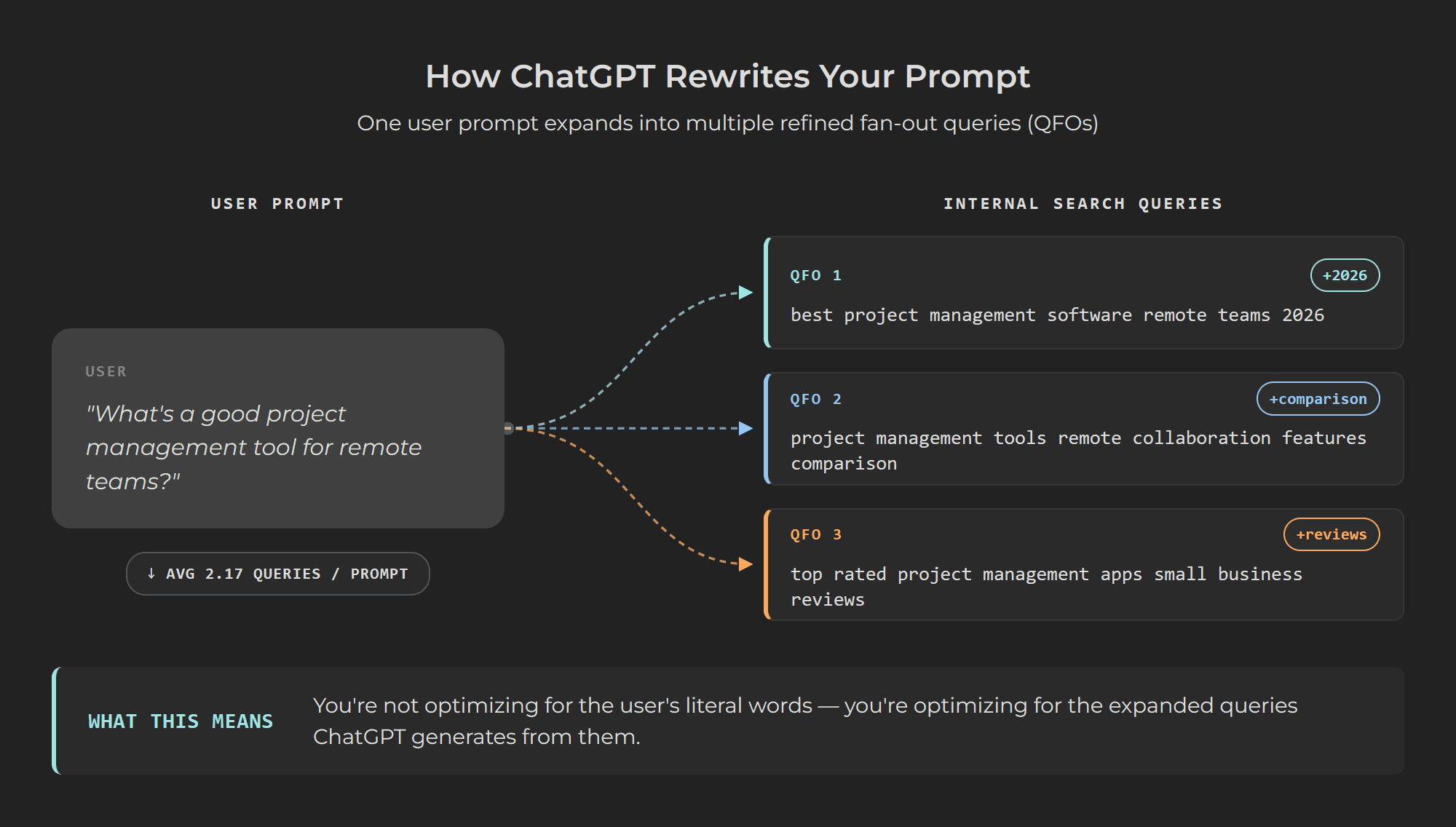
Nectiv's study of 8,500+ prompts (the first large-scale analysis of ChatGPT's internal search behavior) found that when ChatGPT searches, it generates an average of 2.17 sub-queries per prompt. Those queries average 5.48 words - roughly 60% longer than Google's average 3.4-word query. 77% of fan-out queries exceeded 5 words.
The queries follow a consistent pattern. ChatGPT strips filler, promotes entities (brand names, product categories), and aggressively injects commercial modifiers. A user prompt like "What's a good project management tool for remote teams?" becomes QFOs like:
- "best project management software remote teams 2026"
- "project management tools remote collaboration features comparison"
- "top rated project management apps small business reviews"
Peec.ai's analysis of 20 million QFOs (published April 2026) found that QFO word count roughly doubled between October 2025 and January 2026, while the number of QFOs per prompt stayed flat. ChatGPT is getting more precise with each query, not running more of them.
Semrush's clickstream analysis of tens of millions of ChatGPT sessions reveals the scale of this divergence from Google: 65-85% of ChatGPT prompts cannot be matched to any keyword in Semrush's 27-billion-term search database. About 70% represent "entirely new types of search intent" not seen in classical search logs - tasks, scenarios, and multi-step comparisons rather than keyword lookups.
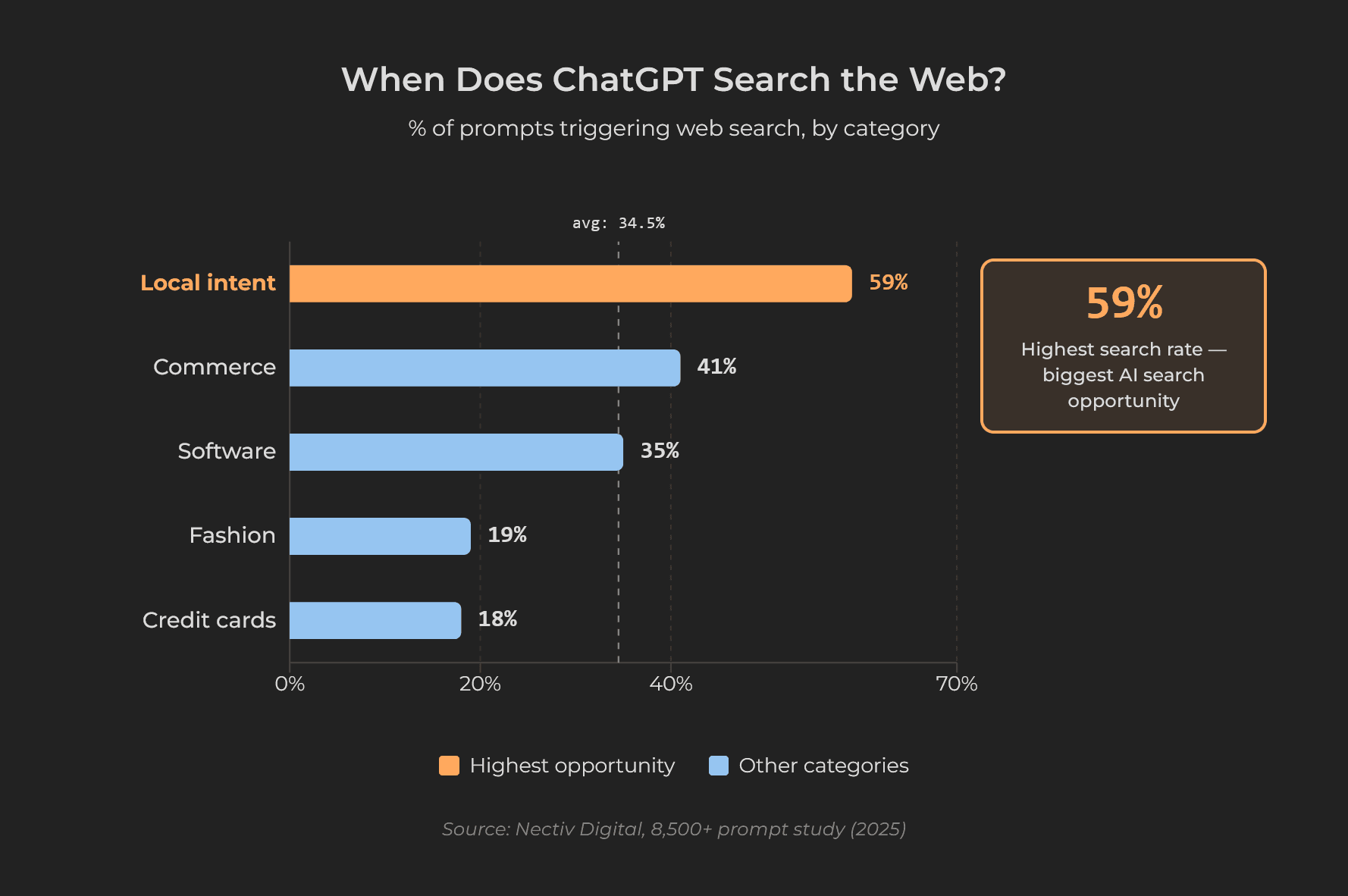
Search rates vary dramatically by category. Nectiv's vertical breakdown:
| Category | Search Rate | What This Means |
|---|---|---|
| Local intent | 59% | Location-dependent answers need live data |
| Commerce | 41% | Product recommendations need current info |
| Software | ~35% | Reviews and comparisons change fast |
| Fashion | 19% | Trends mostly covered by training data |
| Credit cards | 18% | Rates and benefits are relatively stable |
If your industry triggers high search rates, optimizing for ChatGPT's web search layer matters significantly. If search rates are low, you need cross-web brand presence to influence training data instead.
How Do You Extract This Data?
Three methods, ranging from zero-code to enterprise-scale.
Method 1: Browser + JSON export (free, manual)
- Open
https://chatgpt.com/?hints=search&q=[your query]in your browser - ChatGPT searches and responds with citations
- Open Chrome DevTools (F12) > Network tab, find the conversation JSON
- Look for
metadata.search_model_queries- this array contains every internal query ChatGPT ran - Look for
sources_footnote(main citations),supporting_websites(considered but not cited), andsafe_urls
Alternatively, use ChatGPT's built-in export (Settings > Data Controls > Export Data) to get conversation JSON in bulk.
Method 2: Bookmarklets and extensions (free, semi-automated)
JC Chouinard's ChatGPT Query Fanout Analyzer is a bookmarklet that fetches the active conversation's JSON and renders a table of all internal queries, cited URLs, and entities. One click, no code needed.
Chrome extensions like ChatGPT Internal Query Extractor and ChatGPT Sources & Citations Exporter automate the same extraction and export to JSON or CSV.
Method 3: API or commercial platforms (paid, scalable)
OpenAI's official Responses API supports a web_search_preview tool that returns structured citation data (URLs, titles, character indices) - fully documented and stable, unlike the UI parameter. For teams running hundreds of prompts, commercial platforms like Nectiv AI Tracker and Spotlight handle extraction at scale.
Rate limits: Plan for about 100-150 search-triggering prompts per browser session before rotating sessions or user agents. The parameter is rate-limited by standard session throttling, not a hard cap. For larger runs, the API is more reliable.
What Does ChatGPT's Source Selection Reveal?
ChatGPT's citation patterns follow clear, measurable rules that differ from Google's ranking signals.
Domain authority is a hard gate. Ahrefs' analysis of ChatGPT's top 1,000 cited pages found that 65.3% sit on domains with DR 81+, with a median domain rating of 90. But here's the surprise: page-level authority barely matters. The median URL Rating for those top-cited pages was just 6. ChatGPT trusts domains, not individual pages. If your domain passes the trust threshold, even new pages with no backlinks can get cited.
Freshness is the strongest content-level signal. SE Ranking and ALM Corp data shows content updated within 30 days receives about 3.2x more citations than content older than 90 days. Among Ahrefs' top-cited URLs, 76.4% were updated within the last 30 days. Monthly content refreshes are associated with roughly 23% higher AI coverage.
Position on the page matters. Kevin Indig's analysis of 1.2 million AI answers and 18,012 verified citations found that 44.2% of citations come from the first third of content, 31.1% from the middle third, and 24.7% from the final third. Conclusions at the very bottom of articles are largely ignored.
Format preferences are consistent: Listicles and "best X" comparisons dominate commercial citations. FAQ sections and structured Q&A earn ~40% more citation weight than unstructured text. Pages above ~2,900 words are 59% more likely to be cited than those under 800 words.
Review platforms amplify trust. Domains with active profiles on G2, Trustpilot, Capterra, or Yelp have roughly 3x higher citation probability. ChatGPT appears to treat review platform presence as a "real brand" verification signal.
For the metadata layer that complements these content signals, see Schema Markup for AI Citations. For body-text structure that improves extraction, see How to Structure Content That AI Systems Actually Cite.
How Do You Turn Fan-Out Data Into Content Strategy?
Run 100 representative prompts for your industry through ?hints=search. Extract all QFOs and cited sources. Then analyze four dimensions.
1. Modifiers and patterns. Tally the most frequent qualifiers in the QFOs: "best," "top," "2026," "for startups," "for enterprise," "pricing," "integrations," "alternatives," "vs." This gives you the commercial and segment breakdown ChatGPT uses behind the scenes. If QFOs consistently include "for mid-market" but your content only addresses "enterprise," you've found a targeting gap.
2. Task clusters. Group QFOs into decision stages: evaluation ("best X for Y"), comparison ("X vs Y"), implementation ("how to set up X with Z"), risk ("limitations," "downsides"), and optimization ("best practices for X"). Each cluster should map to at least one strong content asset.
3. Entity coverage. Check which brands appear in QFOs and citations and which don't. If your brand never shows up in QFOs around your own category, you likely have weak entity clarity on-site or insufficient cross-web presence (few review profiles, media mentions, or community references).
4. Source archetypes. Classify cited URLs: reference sites, media, review platforms, competitor content, community threads. This shows where ChatGPT currently "sees" your category. If most citations come from G2 and Forbes, that's where your authority-building should focus.
Case studies show this works. A B2B SaaS company tracked by Dataslayer discovered through AI logs that ChatGPT recommended competitors for "integrations with Salesforce" prompts despite having strong Salesforce support. They published a detailed integration guide and started appearing in AI answers within 30 days.
A fintech company reported by Mersel AI implemented structured "answer objects" across core pages, coordinated with review and media signals. AI visibility rose from 2.4% to 12.9% across tracked prompts in 92 days, generating 94 citations and contributing to about 20% of demo requests.
In a sponsored case study published on Search Engine Journal, the agency No Fluff reported on a new business running weekly AI visibility sprints. After six weeks: visibility in 16.5% of relevant AI responses, 39 of 150 targeted questions, 74 mentions with 42 cited. From zero to measurable AI presence in under two months.
CompetLab's AI Visibility tracking reports, per engine, how often ChatGPT, Claude, Gemini, Perplexity, and Google AI Overviews recommend your brand, and which pages Perplexity and Google AI Overviews retrieved - so you can see whether your content changes actually changed what the engines open, not just hope they do. To set up baseline measurement, see How to Measure Your AI Visibility.
Frequently Asked Questions
Is the ?hints parameter still working in 2026?
Yes. As of April 2026, ?hints=search remains functional on chatgpt.com for Plus users. The format https://chatgpt.com/?hints=search&q=[query] reliably opens ChatGPT Search. An earlier /search path started returning 404 in mid-2025, but the root path pattern continues to work. OpenAI has not officially documented or deprecated it. However, since it's undocumented, it could change without notice.
Do I need a paid ChatGPT account to use the ?hints parameter?
You need a ChatGPT Plus subscription ($20/month) for reliable access to the search mode triggered by ?hints=search. Free users may have limited or no access to ChatGPT Search. For the JSON export and fan-out query extraction, no additional tools are required - Chrome DevTools and ChatGPT's built-in export work. Free bookmarklets and browser extensions can automate the extraction.
What's the difference between forced search and natural ChatGPT behavior?
The ?hints parameter forces a 100% search rate - every prompt triggers web search. ChatGPT's natural search rate is about 31-34.5% of prompts (Semrush). This means you're analyzing the maximum extent of ChatGPT's search capability, not average behavior. For competitive analysis, this is valuable because you see what ChatGPT would find if it searched for your topic. For visibility estimates, combine hints data with the baseline search rate.
How many queries can I run before hitting rate limits?
Practitioners report a practical limit of about 100-150 search-triggering prompts per browser session before experiencing slower responses, CAPTCHAs, or temporary blocks. Mitigation strategies: use ?temporary-chat=true to avoid polluting history, rotate between sessions or incognito windows, and implement delays between requests. For larger-scale analysis (hundreds to thousands of queries), use the official ChatGPT API with web search tools or commercial platforms like Nectiv AI Tracker.
Should I optimize content differently for ChatGPT than for Google?
Not a separate strategy, but an expanded one. ChatGPT's internal queries are longer, more comparison-heavy, and more commercially modified than Google queries. You don't need different content - you need to expand your coverage from short head terms into the QFO-style patterns ChatGPT actually searches: "best [category] for [segment] [year]," "[product] vs [competitor]," "[category] alternatives for [use case]." Structure that content with answer-first sections and keep it fresh. The overlap with good Google SEO is large; the extension into AI-specific patterns is where the gap lives.
See your AI visibility
Find out how ChatGPT, Claude, Gemini, Perplexity and Google AI Overviews answer when buyers look for tools like yours — where you show up, and against whom.
Share this article