AI Crawlers and JavaScript: Why Your Content Is Invisible

Your site ranks well on Google. Your Core Web Vitals are green. But when someone asks ChatGPT about your product category, you're nowhere in the response.
The problem isn't your content quality. It's that AI crawlers never saw your content in the first place.
Key Takeaways
- AI crawlers (GPTBot, ClaudeBot, PerplexityBot) cannot execute JavaScript and timeout after 1-5 seconds
- JavaScript-based lazy loading makes content completely invisible to AI search - not slow, invisible
- Native image lazy loading (
loading="lazy") is safe because the img tag stays in HTML - Your LCP element should never be lazy-loaded - one site lost 20% traffic making this mistake
- Test your pages with
curlto see exactly what AI crawlers see
Unlike Googlebot, AI crawlers from OpenAI, Anthropic, and Perplexity cannot execute JavaScript. If your content loads through JavaScript - which includes most lazy-loading implementations - those crawlers see a blank page. According to Vercel's analysis of AI crawler behavior, 70% of JavaScript-heavy websites remain completely invisible to AI search platforms.
This isn't a performance issue you can optimize around. It's an architectural gap that requires understanding how AI crawlers work differently than the search bots you're used to.
How Do AI Crawlers Handle JavaScript Differently Than Google?
Googlebot operates like a browser. It fetches your page, executes JavaScript in a headless Chromium instance, waits up to 20 seconds for content to render, then indexes what it sees. This two-wave system means client-side rendered React apps work fine for Google - eventually.
AI crawlers work nothing like this.
GPTBot, ClaudeBot, and PerplexityBot fetch your HTML and that's it. No JavaScript execution. No waiting for API calls. No rendering engine. They operate more like curl or wget - whatever HTML arrives in the first response is all they'll ever see.
The timeout differences are stark. Googlebot waits 20 seconds for content. AI crawlers abandon requests after 1-5 seconds. That's a 4-20x gap in patience.
| Crawler | JavaScript Execution | Timeout | Content Priority |
|---|---|---|---|
| GPTBot (OpenAI) | None | 1-3 seconds | HTML (57.7%), Images |
| ClaudeBot (Anthropic) | None | 1-3 seconds | Images (35.2%), HTML |
| PerplexityBot | None | 1-3 seconds | HTML, JSON data |
| Googlebot | Full Chromium | 20 seconds | All content types |
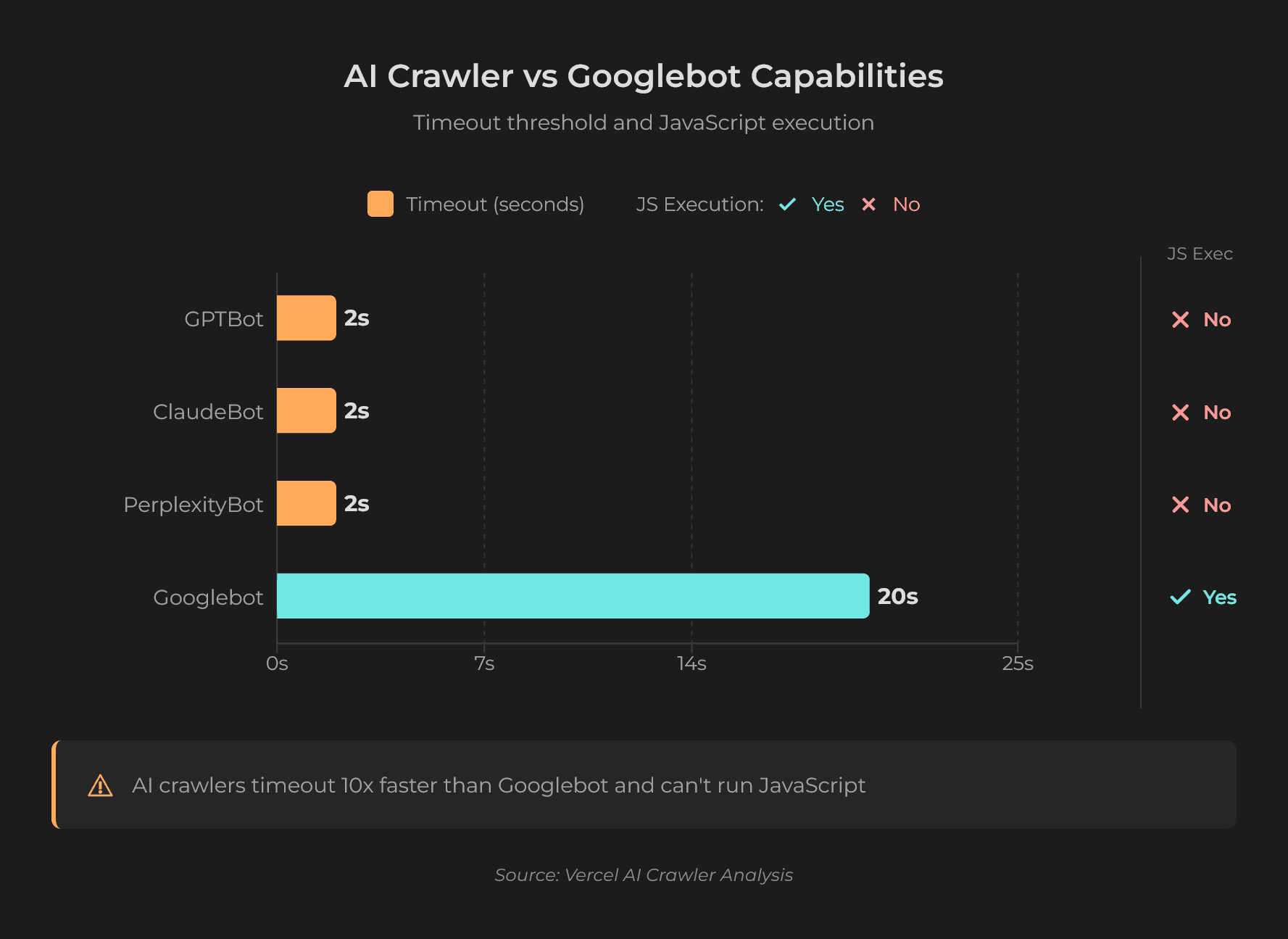
Here's what makes this confusing: AI crawlers do fetch JavaScript files. Vercel's analysis of over 500 million GPTBot requests shows 11.5% target JavaScript files. ClaudeBot fetches even more at 23.84%. But they fetch these files as text - possibly for training data - without ever executing them.
This means content that depends on JavaScript execution is permanently invisible to AI crawlers. Not delayed. Not partially indexed. Invisible.
Understanding how ChatGPT searches differently than Google helps explain why this matters - AI systems are looking for direct answers in your HTML, not waiting for your app to hydrate.
What Happens When AI Crawlers Hit Lazy-Loaded Content?
Not all lazy loading is equal. The impact on AI crawlers depends entirely on how lazy loading is implemented.
Native Image Lazy Loading: Safe
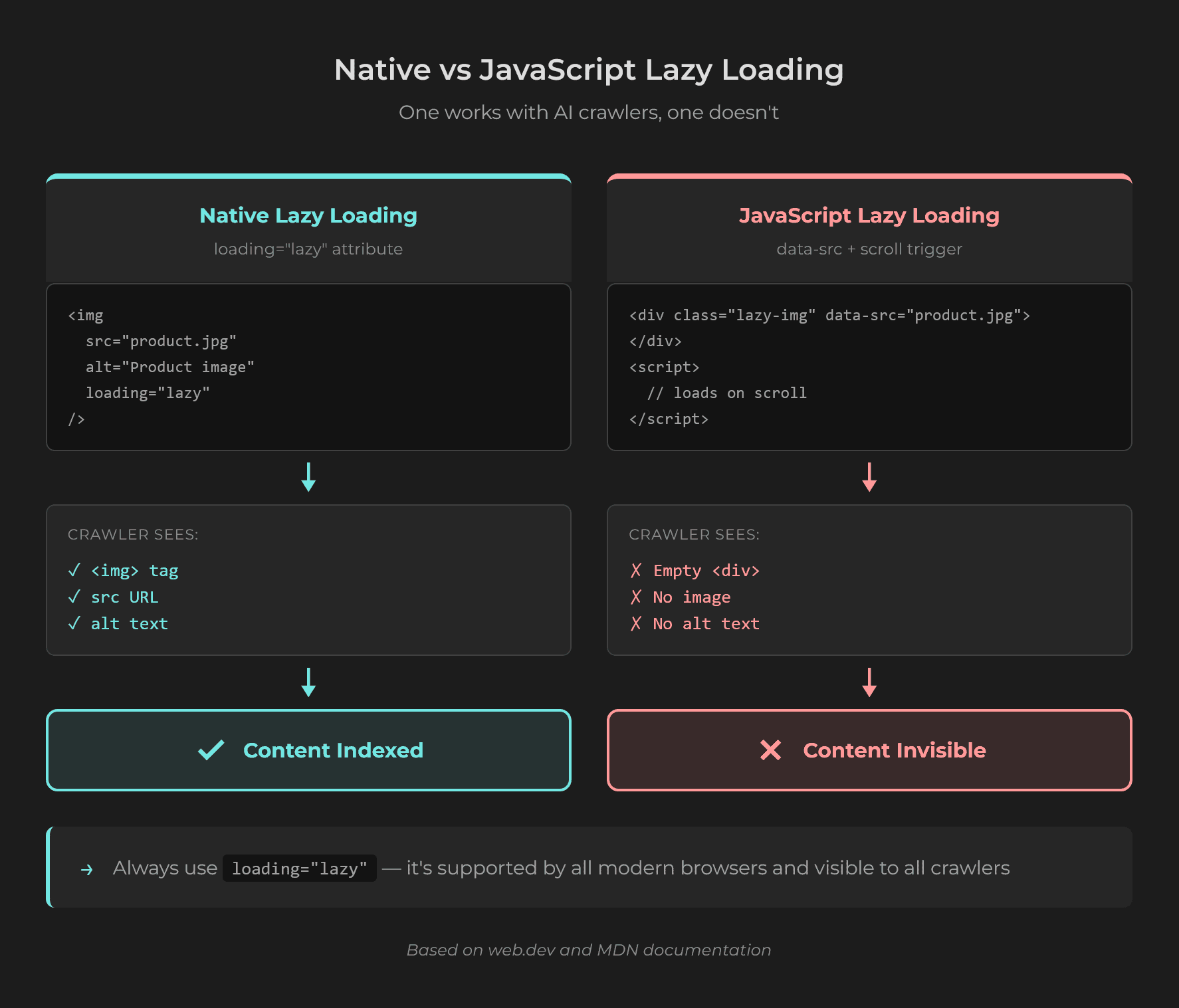
The browser-native loading="lazy" attribute is safe for AI crawlers. Here's why:
<img src="product-photo.jpg" loading="lazy" alt="Premium widget showcase">This image tag exists in your HTML source. The src and alt attributes are visible to any crawler. The browser simply delays downloading the image bytes until the user scrolls near it. AI crawlers see the img element, the URL, and the alt text - everything they need for context.
JavaScript-Based Lazy Loading: Fatal
JavaScript-based lazy loading works differently. The content doesn't exist in the initial HTML at all:
<div id="product-details"></div>
<script>
  // Content loads only after JavaScript executes
  fetchProductDetails().then(data => {
    document.getElementById('product-details').innerHTML = data;
  });
</script>
When an AI crawler requests this page, it receives an empty div. The JavaScript that would populate that div never runs. The crawler moves on, having indexed nothing about your product details.
This pattern appears everywhere: infinite scroll, "Load More" buttons, tabbed content, accordion sections, and product carousels. Any content that loads after user interaction or viewport detection is invisible to AI crawlers.
Real-World Impact
Consider an e-commerce site that lazy-loads product specifications, reviews, and comparison data. A user asks Perplexity: "best waterproof hiking backpack with lumbar support."
Perplexity's crawler visits the product page. It sees the page title and maybe a brief intro paragraph. But the waterproof rating, the lumbar support details, and the customer reviews? All behind JavaScript lazy loading. The crawler captures nothing useful.
A competitor with server-rendered product pages gets cited instead. Not because their content is better - because their content was visible.
Why Page Speed Matters More for AI Than Google
Page speed affects Google rankings, but you have some margin. A 3-second LCP won't kill your visibility.
For AI crawlers, speed is binary. Either your content arrives within the timeout window, or the crawler abandons the request entirely.
TTFB: The First Gate
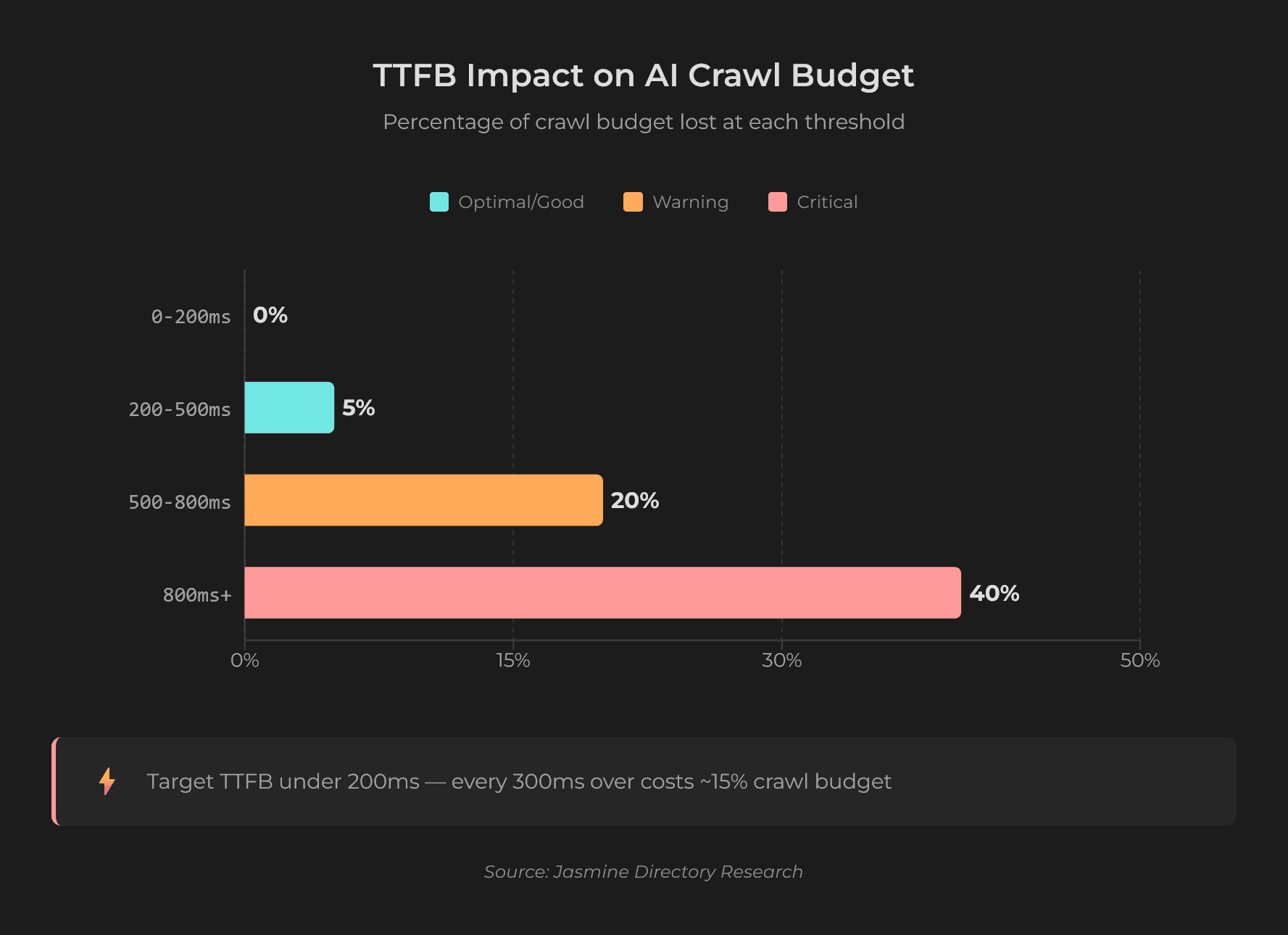
Time to First Byte (TTFB) measures how quickly your server responds. Performance research establishes 200ms as the gold standard threshold for AI crawler success. The degradation is measurable:
| TTFB | AI Crawler Behavior | Impact |
|---|---|---|
| 0-200ms | Full processing, complete resource allocation | Optimal indexing |
| 200-500ms | Selective rendering, reduced parallelism | 3-8% crawl budget loss |
| 500-800ms | HTML-only fallback, minimal resources | 15-25% crawl budget loss |
| 800ms+ | Request abandonment | 30-50%+ crawl budget loss |
One case study documented a site that reduced average page load from 2.8 seconds to 1.1 seconds. Within three weeks, Googlebot's daily crawl volume jumped from 4,200 pages to 11,000 - a 262% increase. For AI crawlers with tighter timeout windows, the impact would be even more dramatic.
LCP: The Content Gate
Largest Contentful Paint measures when your main content becomes visible. AI crawlers use LCP as a proxy for content completeness:
- LCP 0-2.5s: Full processing, complete content extraction
- LCP 2.5-4s: Selective processing, 60-70% content extraction
- LCP 4s+: HTML-only fallback, 20-30% content extraction
The 20% Traffic Drop Case
A news publisher implemented blanket lazy loading across all images to improve PageSpeed scores. It worked - their score jumped from 65 to 92. But they made one mistake: they lazy-loaded their hero images.
LCP deteriorated from 1.8 seconds to 4.2 seconds. AI crawlers processed only headlines and navigation, missing article thumbnails and visual content. Organic traffic dropped 20% over 30 days despite the better PageSpeed score.
The fix was simple: remove lazy loading from above-the-fold elements and add fetchpriority="high" to LCP images. Traffic recovered to 25% above the pre-implementation baseline within six weeks.
Speed also affects how AI systems evaluate your authority. Sites with poor performance signals may receive fewer citations even when content is visible. For more on authority signals, see how backlinks affect AI visibility. The technical floor sits at the front of the workstream sequence - the technical floor inside the broader 90-day sequencing - why this gate has to clear before content, entity, or off-site work compounds shows where this work fits in the broader playbook order.
How to Fix JavaScript Visibility for AI Crawlers
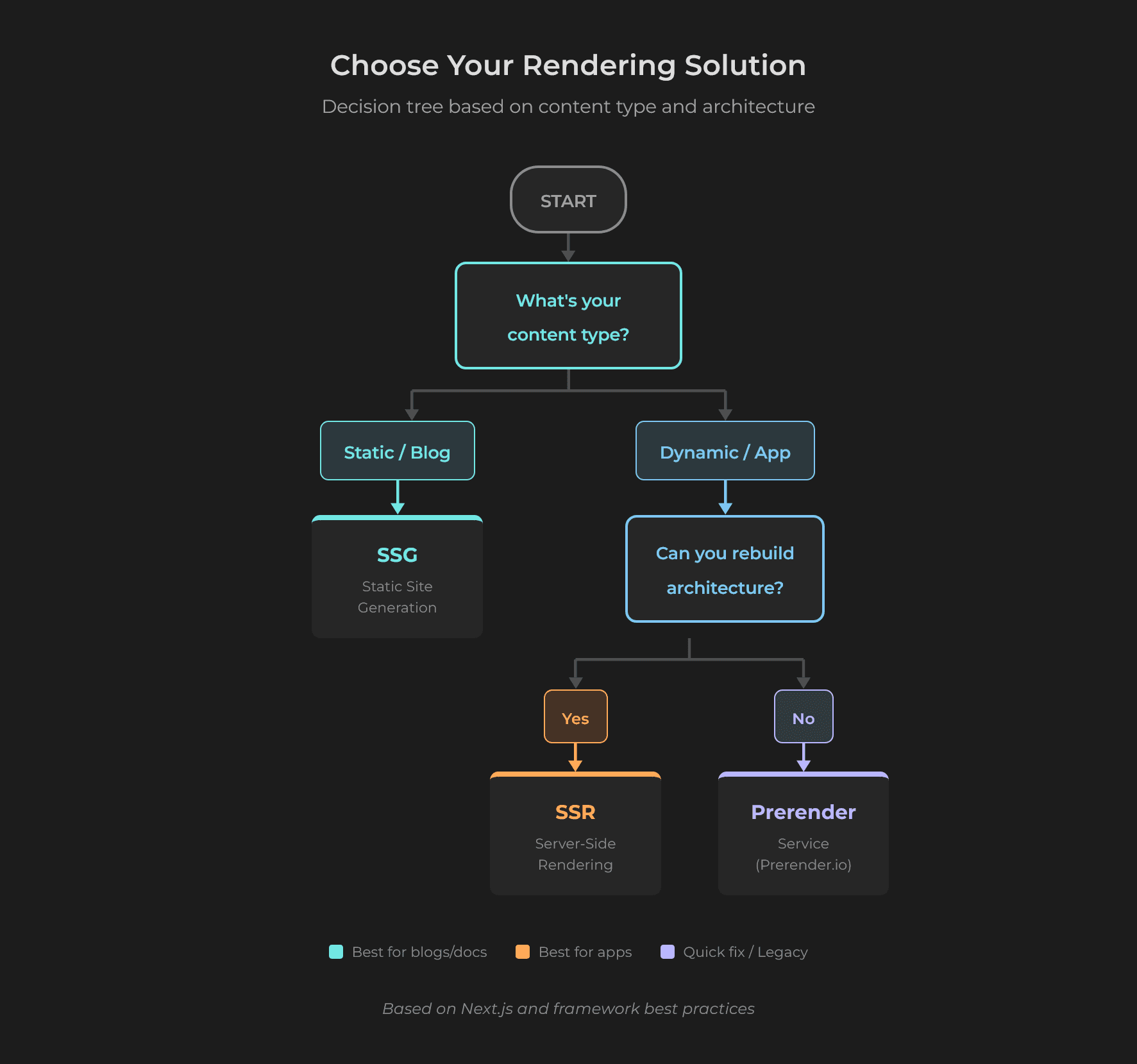
Here's the solution hierarchy, from most effective to easiest to implement.
Server-Side Rendering (SSR)
Pre-render pages on the server for each request. All content appears in the initial HTML response. Every AI crawler sees fully formed HTML without waiting for JavaScript.
One e-commerce platform migrated from React CSR to Next.js ISR. Results after 90 days:
- AI crawler coverage: 0% to 94% of product pages
- ChatGPT citations: 3 to 127 monthly mentions
- Organic traffic: +45% from AI-driven referrals
- LCP: 3.8s to 1.9s
Static Site Generation (SSG)
Build static HTML files at deployment time. Best for content-heavy sites where data doesn't change frequently. This is the fastest option for crawlers since zero rendering is needed.
Prerendering Services
Services like Prerender.io intercept crawler requests and serve pre-rendered HTML while maintaining full JavaScript functionality for human visitors. Prerender.io's case studies document:
- 90% reduced page load times
- 300x improved crawling efficiency
- 80% boost in organic traffic within 60 days
Prerendering works as a temporary solution while you plan a full SSR migration.
What NOT to Do
Don't use client-side rendering for public content. Reserve CSR for authenticated dashboards and internal tools - pages that don't need AI visibility.
Don't lazy-load above-the-fold content. Hero images, H1 headings, CTAs, and introductory paragraphs must load eagerly. This applies to all lazy loading, including native browser lazy loading.
Don't implement infinite scroll without pagination. AI crawlers don't scroll. If content only appears when users scroll, crawlers never see it. Implement paginated URLs (e.g., ?page=1, ?page=2) so each content chunk has its own indexable URL.
Don't inject structured data via JavaScript. JSON-LD schema must be in the initial HTML response. JavaScript-injected schema may not be indexed at all.
Quick Audit Checklist
- Test with curl: Run
curl -A "GPTBot/1.0" https://yoursite.com/pageand check if critical content appears in the response - Review robots.txt: Ensure the answer-time crawlers aren't blocked - OAI-SearchBot and ChatGPT-User, Claude-SearchBot and Claude-User, and PerplexityBot. These decide whether an assistant can cite you. GPTBot and ClaudeBot are training crawlers, and blocking those is a separate, legitimate choice with no documented visibility cost
- Audit lazy loading: Identify any JavaScript-dependent content loading and prioritize conversion to SSR
- Check TTFB: Target under 200ms using CDN edge caching and optimized database queries
- Verify LCP element: Confirm your largest contentful element uses
loading="eager"or default behavior
What to Do Next
Start with the curl test. Run curl -A "GPTBot/1.0" against your most important pages and check whether your key content appears in the response. If it doesn't, you now know why AI systems aren't citing you - and you have a clear path to fix it.
For ongoing monitoring, tools like CompetLab can track whether your brand appears in AI-generated responses across ChatGPT, Claude, Gemini, Perplexity, and Google AI Overviews, helping you measure whether your technical fixes translate into actual AI visibility.
Frequently Asked Questions
Is native browser lazy loading (`loading="lazy"`) safe for AI crawlers?
Yes, for images below the fold. Native lazy loading keeps the img tag with its src and alt attributes in the HTML source. AI crawlers see this metadata even though they don't download the image bytes. The risk is only when you apply lazy loading to above-the-fold content, which harms LCP and can trigger crawler timeouts before main content is visible.
How can I test what AI crawlers see on my site?
Use command-line tools that don't execute JavaScript. Run curl -A "GPTBot/1.0" https://yoursite.com to simulate a GPTBot request. The HTML you see in the response is exactly what AI crawlers see. If your main content is missing, AI crawlers aren't indexing it. You can also use dedicated tools like the AI Crawlability Checker at llmrefs.com for automated analysis.
Will prerendering services like Prerender.io work for AI crawlers?
Yes. Prerendering services detect crawler requests by user agent and serve pre-rendered HTML instead of your JavaScript-heavy pages. This gives AI crawlers the complete content they need while preserving the interactive experience for human visitors. Enterprise case studies document 80% organic traffic improvements and 260% faster indexing speeds.
Should I block AI crawlers if my site uses heavy JavaScript?
Not for visibility reasons, and the crawler names matter here. GPTBot and ClaudeBot are training crawlers by their operators' own documentation, so blocking them carries no documented cost to search or AI answers. The crawlers that decide whether an assistant can cite you are different ones: OAI-SearchBot and ChatGPT-User for ChatGPT, Claude-SearchBot and Claude-User for Claude, and PerplexityBot for Perplexity. Blocking those does reduce citations in that assistant. Blocking a training crawler is a legitimate IP choice, not a visibility mistake. The real fix for a JavaScript-heavy site is server-side rendering or prerendering, so the crawlers you do allow can actually read the page.
See your AI visibility
Find out how ChatGPT, Claude, Gemini, Perplexity and Google AI Overviews answer when buyers look for tools like yours — where you show up, and against whom.
Share this article